Table of Contents
ToggleWhat Is a PLC CPU?
PLC CPU is the central processing unit of a Programmable Logic Controller. It controls every operation inside the PLC and makes decisions based on the program created by the user. Whenever a sensor detects a change or an operator presses a button, the PLC CPU receives that information, processes it, and sends the correct command to the connected output device. Because of this continuous decision-making process, the PLC CPU is widely known as the brain of every PLC system.
Industrial automation depends on speed, accuracy, and reliability. Therefore, every modern PLC includes a powerful CPU that can process thousands of instructions within a very short time. Unlike a regular computer processor, a PLC CPU is specifically designed to operate in demanding industrial environments where dust, vibration, electrical noise, moisture, and temperature changes are common. As a result, it delivers stable performance even during continuous 24/7 operation.
The main responsibility of a PLC CPU is to monitor machine conditions and respond immediately whenever an input changes. First, it reads signals from input devices such as push buttons, proximity sensors, limit switches, pressure sensors, and temperature sensors. Next, it executes the user program stored in memory. Finally, it updates the outputs by sending commands to motors, relays, solenoid valves, alarms, or indicator lights. This complete sequence happens repeatedly within milliseconds, allowing industrial machines to work smoothly and efficiently.
For example, imagine a conveyor belt carrying boxes in a manufacturing plant. A photoelectric sensor detects an incoming box and immediately sends a signal to the PLC CPU. The CPU checks the programmed logic and decides whether the conveyor should continue moving, stop for inspection, or activate a pneumatic cylinder to move the box onto another conveyor. Within a fraction of a second, the correct action takes place without requiring manual intervention. This fast response improves production speed while reducing the possibility of human error.
Today, the role of the PLC CPU extends far beyond basic machine control. Modern CPUs support communication with Human Machine Interfaces (HMIs), SCADA systems, industrial networks, variable frequency drives (VFDs), and remote monitoring platforms. Consequently, engineers can monitor production data, identify faults, optimize machine performance, and manage industrial processes more effectively from a central location.
Understanding the PLC CPU is one of the most important steps for anyone learning industrial automation. Whether you are a student, technician, maintenance engineer, or PLC programmer, a clear understanding of how the CPU works will make it much easier to learn ladder logic, troubleshoot machines, and design reliable automation systems. Moreover, this knowledge provides a strong foundation for understanding every other component of a PLC.
In the following sections of this guide, you will learn how a PLC CPU performs its tasks, what components it contains, how it executes control programs, and why it plays such a critical role in modern industrial automation. By the end of this article, you will have a complete understanding of the PLC CPU and its importance in real-world industrial applications.
Why Is the PLC CPU Important?
Every automated machine depends on quick and accurate decisions. The PLC CPU makes these decisions by continuously processing information from the field and executing the programmed instructions. Without a CPU, a PLC cannot control machinery, communicate with connected devices, or respond to changing operating conditions.
The importance of the PLC CPU becomes clear when we look at how industrial systems operate. Production lines often involve hundreds of sensors and actuators working together at the same time. The CPU collects information from these devices, evaluates the control logic, and sends commands almost instantly. Because this process repeats thousands of times every minute, machines can maintain consistent performance while reducing production errors.
Another reason the PLC CPU is important is its reliability. Industrial facilities cannot afford unexpected downtime because even a short interruption can reduce productivity and increase operating costs. Therefore, PLC manufacturers design CPUs to perform continuously under harsh industrial conditions while maintaining stable operation and high processing accuracy.
The PLC CPU also improves workplace safety. Instead of relying only on manual operation, the CPU can instantly detect unsafe conditions and take corrective action. For example, if a safety sensor detects that a protective door has been opened while a machine is running, the CPU immediately stops the machine according to the programmed safety logic. This rapid response helps protect both equipment and personnel.
Modern industries also require continuous monitoring and data collection. Therefore, today's PLC CPUs support communication with industrial networks and supervisory systems. Engineers can monitor machine status, analyze production data, identify faults, and improve overall system efficiency without standing next to the machine. As industries continue moving toward smart manufacturing, the capabilities of the PLC CPU become even more valuable.
For these reasons, the PLC CPU remains the heart of every PLC-based automation system. It combines fast processing, reliable operation, and intelligent decision-making to keep industrial processes running safely, efficiently, and consistently.
Main Functions of a PLC CPU
The PLC CPU performs much more than simple calculations. It manages the complete operation of an industrial automation system by processing information, making logical decisions, and controlling connected devices. Every action inside a PLC begins and ends with the CPU, making it the most important component of the controller.
One of the primary functions of the PLC CPU is reading input signals. Every industrial process starts with information collected from the field. Sensors, push buttons, limit switches, temperature transmitters, and pressure sensors constantly send signals to the PLC. The CPU reads these signals within milliseconds and determines the current condition of the machine before moving to the next step.
After reading all input data, the CPU executes the user program stored in its memory. This program contains the control logic created by the programmer. The CPU processes every instruction in the correct sequence and evaluates whether specific conditions are true or false. Because this process happens continuously, the PLC can respond immediately whenever an input changes.
Once the program has been executed, the PLC CPU updates the outputs. It sends commands to motors, contactors, relays, solenoid valves, alarms, indicator lights, and many other field devices. These output signals allow machines to start, stop, accelerate, slow down, or perform other programmed actions automatically.
In addition to controlling machines, the PLC CPU continuously monitors the health of the automation system. It checks for communication failures, hardware faults, memory errors, and unexpected operating conditions. If a problem occurs, the CPU can generate alarms or stop the machine according to the programmed safety logic. This feature helps reduce equipment damage and improves operational safety.
Modern CPUs also manage communication between different industrial devices. They exchange data with Human Machine Interfaces (HMIs), SCADA systems, Variable Frequency Drives (VFDs), remote I/O stations, and other PLCs. As a result, operators can monitor production, adjust machine settings, and diagnose faults from a central location without directly accessing the control panel.
Another important responsibility of the PLC CPU is maintaining consistent timing. Industrial processes often require precise control, especially in applications such as packaging, filling, bottling, and assembly lines. The CPU ensures that every programmed instruction runs in the correct order and within the required time, helping machines operate accurately and consistently.
Simply put, every automated decision inside a PLC system depends on the CPU. From processing sensor data to controlling outputs and managing industrial communication, the CPU keeps the entire automation process running smoothly.
Key Components of a PLC CPU
Although the PLC CPU appears as a single module, it contains several internal components that work together to execute the control program. Each component has a specific responsibility, and together they ensure reliable operation in industrial environments.
Processor
The processor is the core of the PLC CPU. It performs calculations, evaluates logical conditions, and executes every instruction stored in the PLC program. During each scan cycle, the processor reads input data, processes the control logic, and updates the outputs. A faster processor can execute more instructions within the same amount of time, making it suitable for complex automation systems.
Memory
Memory stores the information required by the CPU to operate correctly. It contains the user program, configuration settings, process values, timers, counters, and other important data. Some memory retains information even after power is removed, while other sections are cleared when the PLC is switched off. Reliable memory management allows the CPU to restart quickly and continue normal operation.
Clock System
Every PLC CPU includes an internal clock that controls the timing of operations. The clock synchronizes instruction execution and ensures that every scan cycle follows the correct sequence. Stable timing is essential because industrial machines often require precise and predictable control.
Communication Interface
Modern PLC CPUs include built-in communication ports that allow data exchange with other industrial devices. Depending on the PLC model, these interfaces may support Ethernet, USB, RS-232, RS-485, or other industrial communication standards. These connections enable communication with HMIs, SCADA software, engineering workstations, drives, and remote controllers.
Power Management Circuit
The CPU also contains circuits that regulate and distribute electrical power to its internal electronics. Stable power management protects the processor and memory from voltage fluctuations while ensuring reliable operation during continuous industrial use.
Diagnostic System
A built-in diagnostic system continuously monitors the condition of the PLC CPU. It detects hardware failures, communication problems, memory faults, and abnormal operating conditions. When an issue occurs, diagnostic information helps engineers identify the problem quickly and reduce machine downtime.
How These Components Work Together
Each component inside the PLC CPU has a different responsibility, yet they work as one integrated system. First, the communication interface receives information from field devices. Next, the processor analyzes that information using the program stored in memory. The clock keeps every operation synchronized, while the power management circuit provides stable electrical supply throughout the process. At the same time, the diagnostic system monitors the health of the CPU and reports any abnormal conditions.
Consider a simple bottle-filling machine. A sensor detects that a bottle has reached the filling station and sends a signal to the PLC. The communication interface transfers this signal to the processor. The processor checks the program stored in memory and verifies that all operating conditions are correct. If everything is normal, it activates the output controlling the filling valve. Meanwhile, the clock ensures accurate timing so that the correct amount of liquid is dispensed. Throughout the process, the diagnostic system monitors the CPU for any faults. Because every component performs its role at the right moment, the machine operates smoothly, accurately, and safely.
Understanding these internal components makes it much easier to learn how a PLC CPU performs its work in real industrial environments. In the next part of this guide, we will explore how the CPU executes every task step by step through the PLC scan cycle and how this process keeps industrial machines running efficiently.
How a PLC CPU Works – Step by Step
Understanding the internal operation of a PLC CPU becomes much easier when you look at it as a continuous decision-making process rather than a complex electronic device. Every second, the CPU receives information, analyzes it, makes decisions, and controls machines. It performs these tasks so quickly that the entire process appears almost instantaneous.
Unlike a human operator who may take several seconds to react, a PLC CPU completes the same sequence of operations in just a few milliseconds. This incredible speed allows industrial machines to work with high accuracy, repeatability, and reliability throughout the day.
Although every PLC manufacturer has its own hardware design, the basic working principle remains almost the same. The CPU continuously repeats a cycle that keeps the entire automation system running.
How a PLC CPU Processes Information
A PLC CPU never performs a task only once. Instead, it follows a continuous operating cycle. As soon as one cycle finishes, another begins immediately. This loop continues as long as the PLC receives power.
The process starts when the CPU checks every connected input device. It reads signals from push buttons, limit switches, proximity sensors, pressure sensors, temperature transmitters, and many other field devices. At this stage, the CPU simply collects information about what is happening in the machine.
Next, the CPU processes the control program stored in its memory. It evaluates every instruction one by one and compares the current input conditions with the programmed logic. If all required conditions are satisfied, the CPU decides which outputs should change their state.
After making its decision, the CPU sends commands to the output devices. Motors may start rotating, valves may open, conveyors may stop, alarms may activate, or indicator lamps may switch on. Once every output has been updated, the CPU immediately starts reading the inputs again.
Because this entire sequence repeats continuously, industrial machines respond almost instantly whenever operating conditions change.
Understanding the PLC Scan Cycle
The repeated sequence performed by the PLC CPU is known as the PLC Scan Cycle. It is one of the most important concepts in industrial automation because it explains how a PLC continuously controls machines.
A typical scan cycle follows four simple stages.
First, the CPU reads the status of every connected input device.
Next, it executes the user program stored in memory.
Then, it updates all output devices according to the calculated results.
Finally, the CPU performs internal housekeeping tasks such as communication, diagnostics, and memory management before starting the next scan.
This process happens repeatedly without interruption. Even though thousands of scan cycles may occur every second, each cycle follows exactly the same sequence. This predictable operation is one of the main reasons why PLCs are trusted in critical industrial applications.
A Real Industrial Example
Imagine an automatic packaging line producing hundreds of boxes every hour.
A photoelectric sensor detects a box approaching the sealing station. As soon as the sensor detects the box, it sends an electrical signal to the PLC CPU.
The CPU immediately reads that signal during its next scan cycle. It checks the control program and confirms that the conveyor is running normally, the sealing unit is ready, and no emergency condition exists.
Since every condition is correct, the CPU activates the pneumatic cylinder that pushes the box into the sealing position. After the sealing process finishes, another sensor confirms completion. The CPU then restarts the conveyor so the sealed box can move to the next station.
All of these decisions happen within milliseconds. The operator only sees a smooth production process, but behind the scenes the PLC CPU is making hundreds of rapid decisions every second.
This example shows why PLC technology has become an essential part of modern manufacturing.
Why Processing Speed Matters
The speed of a PLC CPU directly affects machine performance.
In a simple water pumping system, a slight delay may not create serious problems. However, high-speed packaging machines, robotic assembly lines, pharmaceutical equipment, and automotive production systems require extremely fast response times.
If the CPU reacts too slowly, products may be positioned incorrectly, robotic movements may lose synchronization, or production quality may decrease.
Therefore, manufacturers select PLC CPUs according to the complexity of the application. Small machines often require only basic processing power, while advanced production systems use high-performance CPUs capable of executing millions of instructions every second.
A faster CPU also improves communication with HMIs, SCADA systems, servo drives, and industrial networks. As a result, operators receive more accurate information, and engineers can diagnose problems much more quickly.
How the PLC CPU Makes Decisions
Many beginners believe that a PLC CPU "thinks" like a human. In reality, it simply follows the instructions written by the programmer.
Every decision comes from logical conditions inside the PLC program.
For example, consider a cooling fan installed inside an industrial control cabinet.
The programmer may create a simple rule:
- If the cabinet temperature rises above the safe limit, start the cooling fan.
- If the temperature returns to a normal level, stop the fan.
When the temperature sensor sends its value to the PLC CPU, the CPU compares the measured temperature with the programmed condition. If the value exceeds the limit, it immediately activates the output connected to the fan. If not, the fan remains off.
The CPU never guesses. It simply executes the programmed logic with speed and accuracy every time.
This predictable behavior makes PLC-controlled systems highly reliable for industrial automation.
Continuous Operation Ensures Reliable Automation
One of the greatest strengths of a PLC CPU is consistency.
Unlike manual operation, the CPU never becomes tired, distracted, or inconsistent. It performs the same calculations in the same order during every scan cycle. Consequently, machines produce identical results hour after hour and day after day.
This consistency improves product quality, reduces waste, minimizes downtime, and increases production efficiency.
For industries such as food processing, pharmaceutical manufacturing, automotive production, chemical plants, and water treatment facilities, reliable operation is not simply an advantage—it is a necessity.
Because of this reliability, PLC technology has become the standard control solution in factories around the world.
At this point, you have learned how a PLC CPU receives input signals, executes the control program, and controls industrial equipment with speed and precision. Next, we will explore the different types of PLC CPUs, compare their features, and help you understand how to choose the right CPU for various industrial automation applications.
Types of PLC CPUs and How to Choose the Right One
Choosing the right PLC CPU is one of the most important decisions when designing an industrial automation system. Every machine has different requirements, so manufacturers produce CPUs with different processing speeds, memory capacities, communication features, and expansion options. A CPU that works perfectly for a small packaging machine may not be suitable for a large automotive production line.
Instead of selecting the most powerful model available, engineers usually choose a CPU that matches the needs of the application. This approach improves system performance while avoiding unnecessary costs.
Types of PLC CPUs
Although PLC CPUs come in many models, they generally fall into three categories based on their performance and intended applications.
Compact PLC CPU
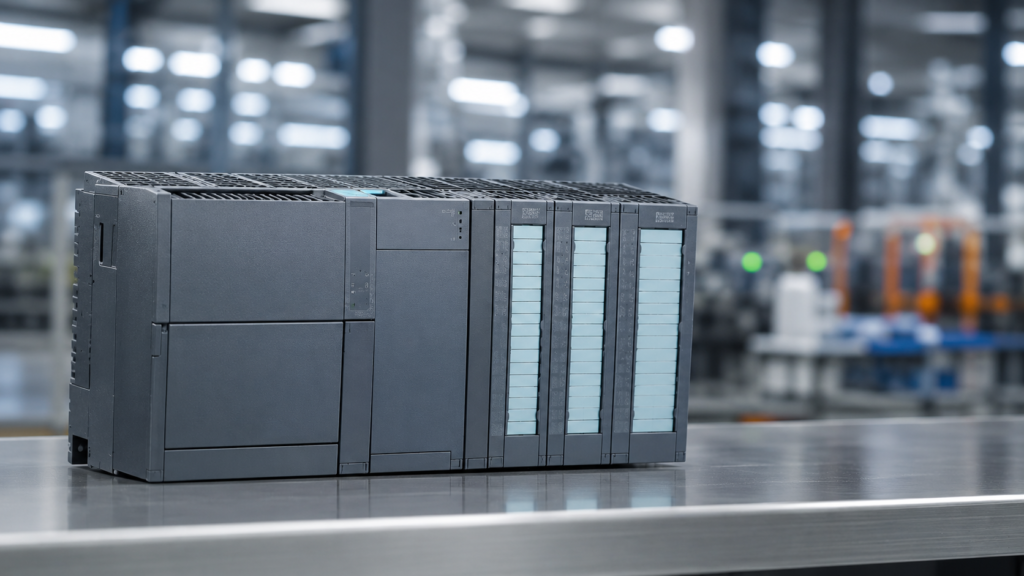
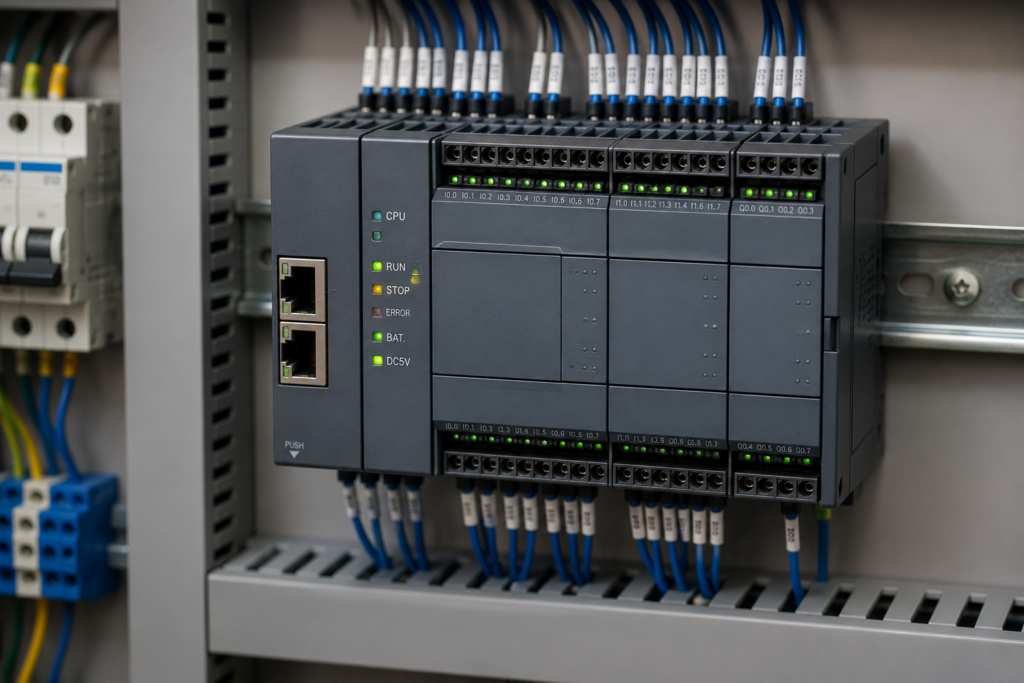
A compact PLC CPU combines the processor, memory, and input/output interfaces into a single unit. These controllers are designed for small automation projects where only a limited number of inputs and outputs are required.
Because everything is built into one device, installation becomes simple and maintenance is easier. Compact CPUs also require less panel space, making them an excellent choice for small machines.
You will commonly find compact PLC CPUs in water pumping systems, automatic doors, small conveyor systems, agricultural equipment, and basic packaging machines.
Modular PLC CPU
A modular PLC CPU offers much greater flexibility. Instead of using one fixed unit, engineers can add or remove hardware modules according to the needs of the project.
For example, if a factory expands its production line, additional input modules, output modules, communication modules, or analog modules can be installed without replacing the entire PLC.
This flexibility makes modular PLC CPUs popular in medium and large industrial plants where future expansion is expected.
Industries such as food processing, pharmaceuticals, textile manufacturing, and chemical production frequently use modular PLC systems because they can easily adapt to changing production requirements.
High-Performance PLC CPU
Some industrial applications require extremely fast processing and advanced communication capabilities. In these situations, manufacturers use high-performance PLC CPUs.
These CPUs are designed for complex automation systems that involve robotics, motion control, high-speed sorting machines, synchronized production lines, and large manufacturing facilities.
A high-performance CPU can execute complex programs, process large amounts of data, and communicate with multiple industrial devices simultaneously. As a result, it delivers excellent performance even in demanding applications where every millisecond matters.
How to Choose the Right PLC CPU
Selecting the right PLC CPU is not simply about buying the newest or fastest model. The best choice depends on the machine, the production process, and future expansion plans.
First, consider the size of the application. A simple machine with a few sensors and motors usually requires only a compact CPU. However, a complete production line with hundreds of devices needs a more powerful controller.
Next, think about future growth. Many factories expand their automation systems over time. Choosing a CPU that supports additional modules can save both time and money in the future.
Communication is another important factor. Modern factories often connect PLCs with HMIs, SCADA systems, drives, barcode scanners, and remote monitoring software. Therefore, the selected CPU should support the communication protocols required by the application.
Processing speed also deserves careful attention. Machines that perform high-speed operations require a CPU capable of executing programs quickly and consistently. On the other hand, simple automation projects rarely need advanced processing power.
Finally, reliability should never be overlooked. Industrial environments demand equipment that can operate continuously with minimal downtime. Choosing a trusted PLC platform with reliable hardware and long-term support helps ensure stable machine operation for many years.
PLC CPU vs Computer CPU
Many beginners assume that a PLC CPU and a computer processor perform the same job because both are called CPUs. However, they are designed for completely different purposes.
A computer processor focuses on general computing tasks such as running operating systems, web browsers, office software, and multimedia applications. Performance and multitasking are its primary goals.
A PLC CPU, however, is built specifically for industrial control. Its main responsibility is to monitor inputs, execute control logic, and update outputs with consistent timing. Instead of maximizing computing power, it prioritizes reliability, stability, and predictable operation.
Another major difference is the operating environment. A personal computer usually works inside a clean office, while a PLC CPU continues operating inside factories where dust, vibration, humidity, and electrical noise are common. This rugged design allows PLCs to perform reliably in conditions that would quickly damage ordinary computer hardware.
A Practical Example
Imagine two different projects.
The first project is a small water pumping station with one pump, a level sensor, and a few control switches. In this case, a compact PLC CPU provides all the required functionality without increasing system cost.
Now consider an automobile assembly plant where hundreds of sensors, robotic arms, conveyors, vision systems, and HMIs work together. Such a facility requires a high-performance PLC CPU capable of processing thousands of signals while maintaining perfect synchronization across the production line.
These two examples show that selecting the right CPU depends on the complexity of the application rather than simply choosing the most expensive model.
Making the Right Decision
A PLC CPU is the heart of every automation system, but not every project needs the same level of performance. Understanding the machine requirements, expected expansion, communication needs, and processing speed helps engineers select the most suitable controller.
A well-chosen CPU not only improves machine performance but also simplifies maintenance, supports future upgrades, and reduces long-term operating costs. Therefore, taking time to evaluate the application's actual needs is always a better approach than selecting hardware based only on specifications.
At this stage, you have learned what a PLC CPU is, how it works, its main functions, internal components, and the different types available for industrial automation. In the next part, we will explore common PLC CPU problems, troubleshooting techniques, maintenance best practices, and real-world applications to help you build a complete understanding of this essential automation component.
Common PLC CPU Problems, Troubleshooting, Best Practices, and Real-World Applications
By this stage, you already understand what a PLC CPU is, how it works, and why it plays such an important role in industrial automation. However, even the most reliable PLC can experience problems. These issues are not always caused by a faulty CPU. In many cases, the real problem comes from wiring, communication, power supply, or incorrect programming.
Knowing how to identify and solve these issues can save valuable production time. It also helps prevent unnecessary hardware replacement and reduces maintenance costs.
Common PLC CPU Problems
Although a PLC CPU is designed for long-term industrial use, it can still face operating problems. Most issues appear because of external conditions rather than a damaged processor.
One common problem is a loss of communication. The CPU may stop exchanging data with an HMI, SCADA system, or remote I/O device. This can happen because of a damaged communication cable, an incorrect network setting, or a failed communication module.
Power-related issues are also common. If the power supply becomes unstable, the CPU may restart unexpectedly or stop working for a short period. Even a brief voltage drop can interrupt an important production process.
Programming mistakes create another frequent challenge. A small logic error may cause a machine to behave unexpectedly even though the PLC hardware is working correctly. For this reason, engineers should always test new programs before using them in a live production system.
Memory problems can also affect system performance. If memory becomes full or important project data is damaged, the CPU may fail to execute the program correctly. Regular backups help reduce this risk.
Environmental conditions should never be ignored. Excessive heat, dust, moisture, or strong electrical interference can reduce the reliability of any industrial controller. Keeping the control panel clean and properly ventilated helps protect the PLC CPU over the long term.
How to Troubleshoot a PLC CPU
Successful troubleshooting begins with observation. Instead of replacing hardware immediately, engineers first collect information about the problem.
Start by checking the CPU status indicators. Most PLCs include diagnostic LEDs that show whether the controller is running normally or if a fault has occurred. These indicators often provide the first clue.
Next, verify the power supply. Make sure the CPU receives the correct input voltage. Loose wiring or unstable power can create problems that look like CPU failures.
Then inspect communication connections. Confirm that Ethernet or serial cables are connected correctly and that network settings match the connected devices.
After that, review the PLC program. A programming error can produce unexpected machine behavior even when the hardware is in perfect condition. Comparing the online program with the latest backup can quickly reveal accidental changes.
Finally, use the diagnostic tools provided by the PLC programming software. These tools display hardware status, communication errors, memory information, and system messages. They often reduce troubleshooting time because they point directly to the source of the problem.
A systematic approach is always better than making random changes. Careful troubleshooting protects both the equipment and the production process.
Best Practices for Reliable PLC CPU Performance
A reliable automation system does not depend only on good hardware. It also depends on proper installation, regular maintenance, and careful programming.
Always install the PLC CPU inside a clean control panel with adequate ventilation. Good airflow helps maintain a stable operating temperature and extends the life of electronic components.
Keep electrical wiring organized and clearly labeled. Proper cable management reduces maintenance time and makes future troubleshooting much easier.
Create backup copies of every PLC project before making program changes. If an unexpected problem occurs, the original program can be restored quickly.
Monitor CPU diagnostics regularly instead of waiting for a machine failure. Early detection of communication warnings or hardware alarms often prevents larger problems later.
When expanding an automation system, confirm that the selected CPU has enough memory and processing capacity for future requirements. Planning ahead avoids unnecessary hardware replacement.
Finally, keep firmware and engineering software updated according to the manufacturer's recommendations. Updates often improve stability, security, and compatibility with newer industrial devices.
Real-World Applications of a PLC CPU
A PLC CPU is used in almost every industry where machines perform automatic tasks. Although the applications are different, the basic responsibility of the CPU remains the same: receive information, process logic, and control equipment.
In manufacturing plants, the CPU coordinates conveyor systems, robotic workstations, assembly lines, and packaging machines. Every movement happens according to the programmed sequence.
In water treatment facilities, the CPU monitors water levels, pump operation, pressure, and flow rates. It starts or stops pumps automatically to maintain stable system performance.
Food and beverage factories use PLC CPUs to control filling machines, mixing equipment, temperature control systems, and production conveyors. Accurate timing helps maintain consistent product quality.
Power generation plants also depend on PLC technology. The CPU monitors critical operating conditions and controls equipment that supports safe and reliable power production.
In warehouses and distribution centers, PLC CPUs control automated storage systems, sorting machines, and material handling equipment. These systems improve efficiency while reducing manual work.
Even small industries benefit from PLC automation. Textile factories, printing machines, agricultural equipment, plastic molding systems, and pharmaceutical production lines all rely on PLC CPUs to improve accuracy and productivity.
No matter the industry, the goal remains the same. The PLC CPU helps machines work faster, safer, and more consistently than manual operation.
Final Thoughts Before the Conclusion
The PLC CPU is much more than an electronic circuit inside a controller. It is the component that transforms programmed instructions into real machine actions. Every time a sensor detects a change, the CPU evaluates the information and makes a decision within milliseconds. This continuous process keeps industrial systems running with speed, precision, and reliability.
Learning how the CPU operates gives you a strong foundation for understanding PLC programming, industrial networking, HMI integration, and advanced automation systems. Whether you plan to become a PLC programmer, maintenance engineer, or automation specialist, mastering the basics of the PLC CPU will make every advanced topic much easier to understand.
Frequently Asked Questions
What is a PLC CPU?
A PLC CPU is the central processing unit of a Programmable Logic Controller. It receives signals from input devices, processes the control program, and sends commands to output devices. Because it controls every operation inside the PLC, it is often called the brain of the system.
What is the main function of a PLC CPU?
The primary function of a PLC CPU is to execute the control program. It continuously reads input signals, processes logical instructions, updates the outputs, and manages communication with other industrial devices. This cycle repeats continuously while the PLC is operating.
Can a PLC work without a CPU?
No. A PLC cannot perform any automation task without a PLC CPU. The CPU is responsible for processing information and controlling every connected device. Without it, the PLC cannot execute the user program or respond to machine inputs.
How fast does a PLC CPU work?
A PLC CPU operates extremely quickly. Most industrial PLCs complete one scan cycle within a few milliseconds. The exact speed depends on the CPU model, program size, and application complexity. Faster CPUs are typically used in high-speed manufacturing and motion control systems.
What devices communicate with a PLC CPU?
A PLC CPU communicates with many industrial devices, including sensors, push buttons, relays, motors, HMIs, SCADA systems, variable frequency drives (VFDs), remote I/O modules, and other PLCs. This communication allows the entire automation system to work together efficiently.
What is the difference between a PLC CPU and a computer CPU?
Although both process information, they serve different purposes. A computer CPU is designed for general computing tasks, while a PLC CPU is built specifically for industrial automation. It focuses on reliable, real-time machine control and is designed to operate continuously in demanding industrial environments.
How do I choose the right PLC CPU?
The best PLC CPU depends on the application. Before selecting a model, consider the number of inputs and outputs, memory requirements, communication options, processing speed, future expansion plans, and the operating environment. Choosing the right CPU improves both performance and long-term reliability.