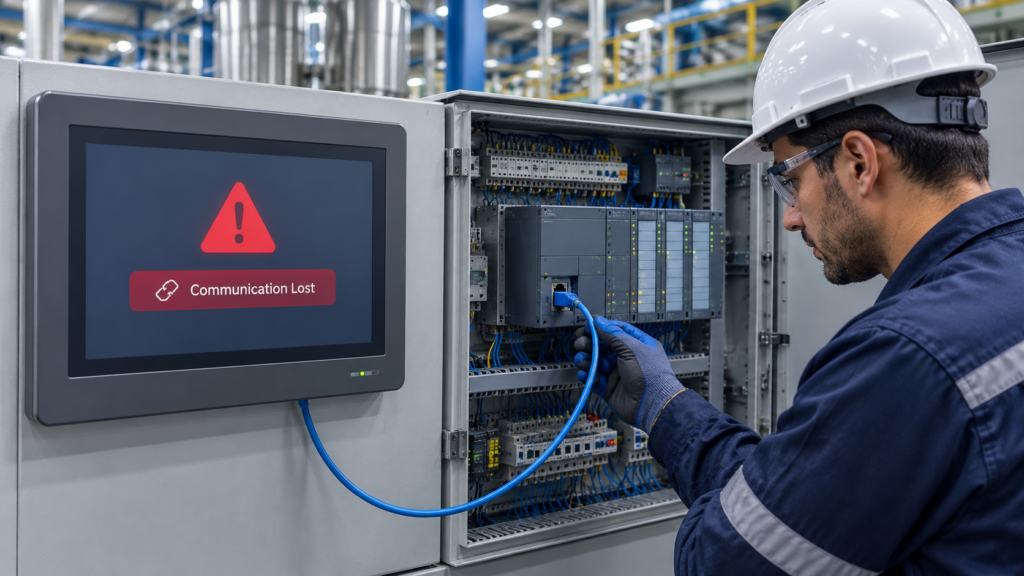
HMI Communication Problems are among the most common challenges in industrial automation. A communication failure can stop production, delay maintenance, and reduce efficiency. In many cases, the issue does not come from the PLC or the HMI itself. Instead, a simple network setting, cable problem, or incorrect configuration causes the connection to fail.
Fortunately, you can solve most HMI Communication Problems with a clear troubleshooting process. You do not need to replace expensive hardware every time the HMI displays an error. Instead, you need to understand how the communication system works and check each component in the correct order.
Whether you are an automation engineer, maintenance technician, student, or factory owner, this guide will help you identify the real cause of communication failures. Moreover, you will learn practical solutions that save time and prevent unnecessary downtime. Every step uses simple language. Therefore, even beginners can follow the process with confidence.
In this guide, you will discover the most common causes of HMI Communication Problems, practical troubleshooting methods, and expert tips that help maintain a stable communication network between the HMI and PLC.
What Are HMI Communication Problems?
HMI Communication Problems occur when the Human Machine Interface cannot exchange data with a PLC or another industrial controller. The HMI depends on continuous communication to display machine status, alarms, process values, and operator controls. When that communication stops, the operator loses visibility and control of the process.
Imagine an operator pressing the Start button on the HMI. Normally, the command reaches the PLC instantly. The PLC then starts the motor or machine. However, if communication fails, nothing happens. The HMI may freeze, display an alarm, or show outdated values. As a result, production slows down and troubleshooting becomes necessary.
Modern factories rely on communication every second. Therefore, even a small interruption can create significant production losses. A reliable communication system keeps machines running safely and efficiently.
Why Stable HMI Communication Matters
A stable connection does much more than display numbers on a screen. It allows operators to monitor production, adjust machine settings, and respond quickly to alarms.
When communication remains stable, operators trust the displayed information. They can make decisions with confidence because the HMI reflects the real machine status.
However, unstable communication creates confusion. Operators may see incorrect values or delayed updates. Consequently, they might stop production even when the machine operates correctly.
Reliable communication also improves maintenance. Engineers can identify faults quickly because the HMI provides accurate information. Therefore, repairs become faster and downtime decreases.
How HMI and PLC Communicate
Before troubleshooting HMI Communication Problems, you should understand how communication normally works. A clear understanding makes it much easier to identify the real cause of a failure. Moreover, it helps you avoid unnecessary repairs.
The HMI serves as the operator interface, while the PLC controls the machine. Both devices exchange data through a communication network such as Industrial Ethernet or serial communication. As a result, operators can monitor and control industrial processes in real time.
When an operator presses a button on the HMI, the command converts into a communication request. The request then travels through the communication network until it reaches the PLC. Therefore, every action depends on a stable connection.
After receiving the request, the PLC processes the programmed logic and executes the required operation. It then sends updated information back to the HMI. Consequently, the operator immediately sees the latest machine status.
This entire communication cycle usually takes only a few milliseconds. Therefore, machines respond almost instantly during normal operation. Smooth communication also improves production efficiency and operator confidence.
However, if any part of this communication path fails, HMI Communication Problems begin to appear. The HMI may stop updating, display communication errors, or lose connection with the PLC completely.
Common Signs of HMI Communication Problems
Most HMI Communication Problems do not happen without warning. Instead, the system usually provides clear signs before communication stops completely. Recognizing these symptoms early can reduce machine downtime.
One of the most common indicators is a Communication Lost message on the HMI screen. This warning usually appears when the HMI cannot exchange data with the PLC. As a result, operators lose visibility of the running process.
Sometimes the HMI screen freezes even though the machine continues operating normally. Process values remain unchanged because fresh data no longer reaches the display. Consequently, operators may assume the machine has stopped when it has not.
Another common symptom involves outdated process values. Tank levels, motor speeds, temperatures, or pressure readings remain fixed even while production continues. Therefore, operators should never ignore static values during operation.
In some cases, operators press touchscreen buttons repeatedly because the HMI does not respond. However, the actual problem often exists in the communication network rather than the touchscreen itself. Checking the communication status can save valuable troubleshooting time.
Alarm messages related to communication timeouts or PLC connection failures also provide important clues. Therefore, engineers should always read the complete error message before making changes. The displayed information often points directly to the source of the problem.
Some factories experience intermittent communication failures instead of permanent ones. The HMI works normally for several minutes before disconnecting briefly and reconnecting again. In many situations, this behavior indicates an unstable network instead of damaged hardware.
What Causes HMI Communication Problems?
Many different factors can cause HMI Communication Problems. Fortunately, most issues become easier to identify when engineers follow a logical troubleshooting process. A systematic approach prevents unnecessary part replacement.
A damaged Ethernet cable remains one of the most common causes of communication failure. Industrial environments expose cables to vibration, heat, dust, moisture, and mechanical stress every day. Over time, these conditions weaken connectors or damage internal wires.
Incorrect IP address settings also create serious communication issues. If the HMI and PLC use different network ranges, they cannot exchange data correctly. Therefore, verifying network settings should always be an early troubleshooting step.
Sometimes engineers accidentally select the wrong PLC model or communication driver during HMI configuration. As a result, the HMI attempts to communicate using incorrect protocols. Even a small configuration error can prevent successful communication.
Incorrect PLC tag addresses create another common problem. The communication link may remain active, yet the HMI cannot display the correct values because it reads the wrong memory locations. Consequently, operators receive inaccurate information.
Network switches and communication devices can also fail unexpectedly. A faulty switch, damaged port, or unstable power supply interrupts communication between connected devices. Therefore, every network component deserves careful inspection.
Software updates occasionally modify communication settings without the user's knowledge. After an update, devices that previously communicated correctly may suddenly lose connection. Checking recent software changes often helps identify the cause quickly.
Electrical interference presents another challenge in industrial environments. Large motors, variable frequency drives, and heavy electrical equipment generate electromagnetic noise. Poor cable routing increases the risk of unstable communication.
Finally, hardware components naturally wear out over time. Communication modules, Ethernet ports, and interface cards eventually reach the end of their service life. Although hardware failures occur less frequently, engineers should still consider them during advanced troubleshooting.
Understanding Different Communication Methods
Industrial automation systems use several communication methods depending on machine requirements. Therefore, troubleshooting techniques vary according to the communication technology installed. Understanding the network type simplifies the diagnostic process.
Industrial Ethernet has become the preferred communication method in modern factories. It provides high-speed data transfer, stable communication, and easy network expansion. Consequently, most new automation systems rely on Ethernet-based communication.
Serial communication remains common in older industrial systems. Technologies such as RS-232 and RS-485 continue supporting many reliable machines around the world. Although these systems operate more slowly, they still perform well when configured correctly.
Wireless communication is becoming more popular in modern factories. It reduces cable installation and offers greater flexibility for mobile equipment. However, strong signal quality and stable network coverage remain essential for reliable performance.
Some production lines connect several HMIs to one PLC, while others connect multiple PLCs to one HMI. These larger systems require careful network planning and proper device configuration. As a result, good network design significantly reduces future HMI Communication Problems.
Why Random Communication Failures Are Harder to Solve
Permanent communication failures usually have obvious causes. A disconnected cable, damaged connector, or incorrect IP address often stops communication immediately. Therefore, engineers can normally locate these problems quickly.
Random communication failures are much more difficult to diagnose. The system may operate perfectly for hours before suddenly disconnecting without warning. After a short period, communication often returns automatically.
These unpredictable failures require patience and careful observation. Engineers should monitor the system under different operating conditions instead of replacing hardware immediately. Collecting accurate information often reveals hidden problems.
Temperature changes sometimes affect communication equipment during long production shifts. Loose cable connections may also disconnect only when machine vibration increases. Consequently, the fault becomes difficult to reproduce during inspection.
Heavy network traffic can overload communication devices during busy production periods. Likewise, electrical interference from large motors may appear only while specific equipment is running. Therefore, understanding the production environment is equally important.
Instead of guessing, engineers should follow a structured troubleshooting process from beginning to end. A logical approach saves valuable time and reduces unnecessary maintenance costs. In most cases, careful testing leads to the correct solution much faster.
Step-by-Step Guide to Troubleshoot HMI Communication Problems
Finding the real cause of HMI Communication Problems becomes much easier when you follow a structured process. Many engineers make the mistake of changing multiple settings at once. However, that approach often creates additional problems. Instead, check one component at a time and confirm each result before moving to the next step.
A systematic troubleshooting method saves time and reduces unnecessary downtime. Moreover, it helps you identify the actual source of the communication failure instead of relying on guesswork. The following steps work for most industrial automation systems, regardless of the PLC or HMI manufacturer.
Step 1: Inspect the Physical Connection for HMI Communication Problems
Always begin with the simplest checks. Physical inspection often reveals problems that software diagnostics cannot detect. Therefore, spend a few minutes examining the complete communication path before opening any programming software.
Look closely at the Ethernet or communication cable that connects the HMI and PLC. Check for cuts, crushed sections, loose connectors, or broken locking clips. Industrial environments expose cables to vibration, heat, dust, and continuous movement. As a result, cables naturally wear out over time.
Next, inspect every connector carefully. Even a slightly loose Ethernet plug can interrupt communication. Disconnect the cable and reconnect it firmly until it locks into place. Then observe whether communication returns.
Also check the communication ports on both devices. Dirt, corrosion, or damaged pins may prevent a stable connection. Cleaning the port carefully can sometimes solve the problem immediately.
If you suspect cable damage, replace the cable with a tested one instead of assuming it still works. A new cable often eliminates hours of unnecessary troubleshooting.
Step 2: Verify PLC Power and Operating Status
After confirming the physical connection, inspect the PLC itself. Communication cannot succeed if the controller is not operating correctly. Therefore, verify the PLC before changing any communication settings.
Check whether the PLC power indicator is on. Most controllers display clear LED indicators that show their operating condition. A healthy PLC normally displays a RUN status instead of a fault condition.
If the PLC shows an error or fault LED, investigate that issue first. Communication problems often appear because the controller has stopped executing the program. Solving the PLC fault may automatically restore communication.
Review the diagnostic LEDs on the communication module as well. Many PLCs indicate network activity through flashing communication LEDs. If these indicators remain off, the controller may not detect network traffic.
Finally, confirm that the PLC program is running correctly. A stopped controller cannot exchange live process data with the HMI.
Step 3: Confirm the HMI Is Working Correctly
The HMI also deserves careful inspection. Although communication failures often point toward the PLC or network, the HMI itself can create the problem.
Observe the startup sequence after powering on the HMI. A healthy device usually loads the project without unexpected delays or warning messages. If the screen freezes during startup, the issue may involve the HMI software rather than the communication network.
Open the communication status page if your HMI provides one. Many systems display connection status, network health, or communication diagnostics directly on the screen. This information provides valuable clues before deeper troubleshooting begins.
Restarting the HMI is another useful step. Temporary software issues sometimes disappear after a clean restart. However, if communication fails again immediately, continue investigating instead of repeatedly restarting the device.
Step 4: Check Network Configuration Carefully
Incorrect network settings remain one of the leading causes of HMI Communication Problems. Fortunately, they are also among the easiest issues to correct.
Verify the IP address assigned to the HMI. Next, compare it with the PLC network settings. Both devices should belong to the same network while maintaining unique IP addresses.
Pay close attention to the subnet mask and gateway settings. Even a single incorrect number can prevent successful communication. Therefore, compare every value carefully instead of checking only the IP address.
If your factory network contains multiple switches or routers, verify that every device belongs to the correct network segment. Incorrect network routing can interrupt communication even when both devices appear properly configured.
After correcting any settings, restart the communication service or reboot the affected device if required. Then test the connection again before making further changes.
Step 5: Verify Communication Driver and PLC Selection
Every HMI project requires the correct communication driver. Selecting the wrong driver prevents the HMI from understanding PLC data correctly.After correcting any settings, restart the communication service or reboot the affected device if required. Then test the connection again before making further changes.
Open the HMI project configuration and review the selected PLC model. Ensure the configured controller matches the actual hardware installed in the control panel.
Next, verify the communication protocol. Industrial systems may use different protocols depending on the application. Selecting the incorrect protocol immediately causes communication failures.
Also review the communication parameters carefully. Address settings, communication ports, and protocol options must match the PLC configuration exactly. Small differences often create large communication problems.
Saving the correct configuration and downloading the updated project may restore communication instantly if configuration errors caused the issue.
Step 6: Check PLC Tags and Variable Addresses
Communication may appear normal while process values remain incorrect. In many situations, incorrect PLC tag mapping causes this behavior.
Verify that every HMI variable points to the correct PLC memory location. Compare each address with the PLC program to confirm accuracy.
Pay special attention after modifying the PLC program. Engineers sometimes change variable addresses but forget to update the HMI project. Consequently, the HMI continues requesting outdated memory locations.
Consistent tag naming also improves troubleshooting efficiency. Clear variable names reduce confusion during future maintenance and software updates.
Once all addresses match correctly, download the updated HMI project and monitor live values again.
Step 7: Test the Network Connection
After verifying configuration settings, confirm that the communication network actually works.
Start by checking link indicators on switches, PLC communication ports, and HMI Ethernet ports. Active LEDs usually confirm that the physical connection exists.
Next, test communication between network devices using appropriate diagnostic tools supported by your automation platform. Successful communication confirms that the network path remains available.
If communication fails, isolate the problem by testing one network segment at a time. This method quickly identifies damaged switches, faulty cables, or unstable connections.
Testing each section individually prevents unnecessary hardware replacement and speeds up troubleshooting considerably.
Step 8: Review Recent Changes
Many HMI Communication Problems begin shortly after system modifications. Therefore, always ask what changed before the failure appeared.
A recent software update may have modified communication settings. Likewise, replacing hardware or downloading a new project may introduce unexpected configuration errors.
Even routine maintenance can accidentally disconnect cables or change network settings. Reviewing recent work often leads directly to the root cause.
If communication worked correctly before the changes, compare the previous configuration with the current one. Small differences frequently explain unexpected failures.
Instead of guessing, verify every modification carefully before replacing expensive hardware.
Advanced Troubleshooting for HMI Communication Problems
Sometimes the basic checks restore communication within minutes. However, certain HMI Communication Problems require a deeper investigation. When simple solutions do not work, engineers should move to advanced diagnostics instead of replacing hardware immediately. A careful analysis often reveals hidden issues that basic inspections cannot detect.
Monitor Communication Status in Real Time
Most modern HMIs and PLCs provide built-in diagnostic tools. These features display communication status, connection quality, error codes, and network activity. Therefore, reviewing diagnostic information should become part of every troubleshooting routine.
Pay attention to communication counters and error logs. If communication errors continue increasing, the system is still experiencing network instability. On the other hand, stable counters usually indicate that communication has recovered successfully.
Keep the diagnostic screen open for several minutes. Some HMI Communication Problems appear only during production. Continuous monitoring helps you identify intermittent failures before they become serious.
Check the Industrial Network Switch
The network switch plays an important role in industrial communication. Even when the HMI and PLC operate correctly, a faulty switch can interrupt data transmission.
Inspect every Ethernet port carefully. A damaged port may create unstable communication even though the cable appears connected. Therefore, test another available port whenever possible.
Look at the LED indicators on the switch. Blinking activity lights usually confirm normal communication. However, missing or abnormal indicators may suggest a hardware issue.
If the switch supports diagnostics, review its event logs. These records often reveal network interruptions, excessive traffic, or communication errors.
Identify Electrical Interference
Electrical noise remains one of the most overlooked causes of HMI Communication Problems. Large motors, welding equipment, and variable frequency drives generate electromagnetic interference that affects communication cables.
Observe whether communication failures occur only while heavy equipment starts or stops. If the problem appears during these moments, electrical interference becomes a likely cause.
Separate communication cables from high-voltage power cables whenever possible. Good cable routing significantly improves communication reliability.
Using properly shielded industrial Ethernet cables also reduces the impact of electrical noise. Although this solution appears simple, it often solves long-term communication issues.
Review PLC Scan Time
The PLC scan cycle influences communication performance. If the controller becomes overloaded, communication may slow down or become unstable.
Review the PLC scan time during normal machine operation. A sudden increase may indicate excessive program complexity or unexpected processing loads.
Large programs, complex calculations, or continuous data logging can increase controller workload. Therefore, optimizing the PLC program may improve communication stability.
After reducing unnecessary processing tasks, monitor communication again. Many systems become more responsive once the controller workload returns to normal.
Verify Firmware Compatibility
Firmware compatibility also affects communication reliability. New firmware versions sometimes introduce communication improvements. However, mismatched firmware may also create unexpected problems.
Compare the firmware versions of the HMI, PLC, and communication modules. Manufacturers often recommend compatible software versions for reliable operation.
If one device uses a much newer or older firmware version, review the compatibility information before making changes.
Always follow the manufacturer's update procedure carefully. An incomplete firmware update can create additional communication issues.
How to Prevent HMI Communication Problems
Preventing HMI Communication Problems always costs less than repairing unexpected downtime. A few preventive maintenance practices can keep communication stable for many years.
Inspect communication cables during scheduled maintenance instead of waiting for failures. Early detection prevents small cable damage from becoming a major production issue.
Keep electrical cabinets clean and dry. Dust, moisture, and excessive heat reduce the lifespan of communication equipment.
Regularly back up both the PLC program and the HMI project. If communication settings become corrupted, you can restore the original configuration quickly.
Document every network setting after installation. Accurate records simplify future maintenance and reduce troubleshooting time.
Finally, train maintenance personnel to follow standardized troubleshooting procedures. Consistent methods reduce mistakes and improve maintenance efficiency.
Best Practices for Reliable HMI-PLC Communication
Reliable communication begins with proper system design. Engineers who follow proven industry practices experience fewer communication failures throughout the equipment lifecycle.
Choose industrial-grade communication cables instead of standard office network cables. Industrial environments demand higher durability and better protection against electrical interference.
Label every communication cable clearly. Proper labeling allows technicians to identify connections quickly during maintenance.
Avoid unnecessary network complexity. A simple and organized communication network remains easier to troubleshoot and maintain.
Protect communication equipment from excessive heat, vibration, and moisture. Environmental protection extends equipment life and improves long-term reliability.
Review communication performance during preventive maintenance instead of waiting for alarms. Small problems become easier to correct before they affect production.
Common Mistakes That Cause HMI Communication Problems
Many communication failures result from simple human mistakes rather than hardware damage. Understanding these common errors helps engineers avoid unnecessary downtime.
One frequent mistake involves assigning duplicate IP addresses. Two devices sharing the same address create unstable communication and unpredictable network behavior.
Another common error occurs when engineers forget to download updated HMI projects after changing PLC addresses. Consequently, the HMI continues requesting incorrect data.
Loose Ethernet connectors also create intermittent communication failures. Although the cable appears connected, vibration gradually weakens the connection.
Ignoring warning messages represents another costly mistake. Small communication warnings often appear long before complete communication failure occurs.
Replacing hardware without proper testing also wastes valuable time and money. Instead, engineers should confirm the actual cause before installing new components.
Real-World Example of HMI Communication Problems
A manufacturing company experienced random communication failures between an HMI and a PLC several times each day. Operators noticed that the HMI disconnected for only a few seconds before reconnecting automatically.
At first, the maintenance team suspected a faulty PLC. However, detailed troubleshooting revealed that the controller operated normally throughout the entire process.
The engineers then inspected the communication network step by step. During the inspection, they discovered that an Ethernet cable passed alongside high-voltage motor cables inside the electrical cabinet.
Whenever the large motors started, electromagnetic interference affected the communication cable. As a result, temporary HMI Communication Problems appeared throughout the production shift.
The maintenance team rerouted the Ethernet cable and installed a properly shielded industrial cable. After completing the modification, communication remained stable for several months without additional failures.
This example demonstrates an important lesson. Careful troubleshooting often identifies simple solutions that expensive hardware replacement cannot provide.
Frequently Asked Questions About HMI Communication Problems
1. What are the most common causes of HMI Communication Problems?
Several issues can lead to HMI Communication Problems. The most common causes include damaged Ethernet cables, incorrect IP address settings, loose connectors, incompatible communication drivers, wrong PLC tag addresses, faulty network switches, and electrical interference. Therefore, engineers should inspect both the hardware and software before replacing any equipment.
2. How can I quickly identify HMI Communication Problems?
Start with a visual inspection of the system. Check the communication cable, PLC status LEDs, and HMI error messages. Next, verify the network settings and communication driver. If the problem continues, review the diagnostic logs and monitor the communication status. Following these steps usually helps identify the source much faster.
3. Can a damaged Ethernet cable cause HMI Communication Problems?
Yes. A damaged or poorly connected Ethernet cable is one of the leading causes of HMI Communication Problems. Industrial cables operate in harsh environments where vibration, heat, and mechanical stress gradually reduce their reliability. Replacing a questionable cable with a tested one is often the quickest solution.
4. Why does my HMI display "Communication Lost" even though the PLC is running?
This situation usually indicates a communication issue rather than a PLC failure. The controller may continue executing its program while the HMI cannot receive updated data. Incorrect IP settings, network interruptions, faulty switches, or communication driver mismatches commonly create this condition.
5. How can I prevent HMI Communication Problems in the future?
Preventive maintenance plays an important role. Inspect communication cables regularly, keep electrical panels clean, document network settings, back up PLC and HMI projects, and monitor communication performance during scheduled maintenance. These practices reduce unexpected downtime and improve long-term system reliability.
6. Do software updates affect HMI communication?
Yes, they can. Software or firmware updates sometimes modify communication parameters or compatibility settings. Therefore, engineers should always verify communication after completing an update. Keeping backup files also makes recovery much easier if unexpected issues appear.
7. Can electrical interference interrupt HMI communication?
Absolutely. High-power motors, variable frequency drives, welding machines, and other electrical equipment generate electromagnetic interference. If communication cables run close to these power sources, signal quality may decrease. Proper cable routing and shielded industrial cables help minimize this risk.
8. Should I replace the PLC if communication fails?
Not immediately. Hardware failure is only one possible cause of HMI Communication Problems. In many cases, the issue involves incorrect configuration, damaged cables, loose connectors, or network settings. A systematic troubleshooting process usually identifies the real cause without replacing expensive equipment.
Conclusion
HMI Communication Problems can interrupt production, delay maintenance, and reduce overall efficiency. However, most communication failures have practical solutions when engineers follow a logical troubleshooting process. Instead of guessing, begin with the physical connection, verify the PLC and HMI configuration, inspect the communication network, and review diagnostic information. This structured approach saves both time and maintenance costs.
Reliable communication depends on more than quality hardware. Correct configuration, proper cable installation, regular maintenance, and accurate documentation all contribute to a stable automation system. Moreover, preventive maintenance reduces the risk of unexpected failures and improves long-term equipment performance.
Whether you manage a small machine or a complete production line, understanding HMI Communication Problems allows you to respond faster when issues appear. A few careful checks often restore communication without replacing expensive components. Therefore, investing time in proper troubleshooting skills benefits every automation professional.