Introduction
Every modern automation system depends on smooth communication between machines and operators. One of the most important tasks in industrial automation is to Connect HMI to PLC correctly. When these two devices work together, operators can monitor equipment, change settings, and respond to problems without touching the PLC program directly.
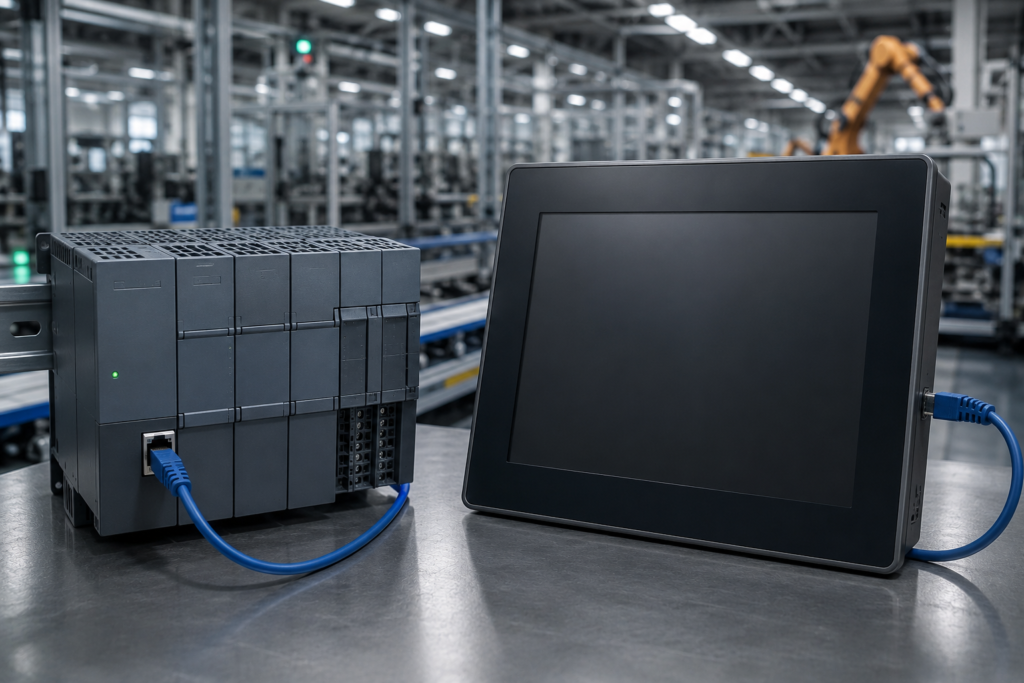
A Human Machine Interface, or HMI, provides a visual screen where users can control machines. A Programmable Logic Controller, or PLC, processes input signals and controls industrial equipment. When you Connect HMI to PLC, the HMI displays real-time data from the PLC. It also allows operators to send commands safely and quickly.
Many industries use this connection every day. Manufacturing plants, food processing facilities, water treatment systems, packaging lines, and energy plants all depend on reliable communication between an HMI and a PLC. Therefore, learning the correct connection process is an essential skill for automation engineers, technicians, and students.
This guide explains every important step in simple language. You will learn the required hardware, communication methods, configuration process, testing procedures, and common troubleshooting techniques. By the end of this article, you will understand how to Connect HMI to PLC with confidence.
What Does It Mean to Connect HMI to PLC?
To Connect HMI to PLC means creating communication between the operator interface and the controller. The PLC collects information from sensors and controls field devices. Meanwhile, the HMI displays that information on a graphical screen.
The connection allows both devices to exchange data continuously. The PLC sends process values, machine status, alarms, and operating conditions to the HMI. At the same time, the HMI sends commands from the operator back to the PLC.
For example, an operator may press the Start button on the HMI screen. The HMI sends this command to the PLC. The PLC then starts the motor according to its control logic. Likewise, if a temperature sensor detects high heat, the PLC sends the updated value to the HMI. The operator immediately sees the change on the display.
This communication creates a simple and safe way to operate industrial equipment. Instead of changing PLC code every time, operators use the HMI screen to control daily operations.
Why Connect HMI to PLC?
Industrial systems require accurate monitoring and fast control. That is why engineers always Connect HMI to PLC before commissioning a machine.
The first advantage is better visibility. Operators can view live process data without opening the PLC software. This saves time and improves productivity.
Another important benefit is easier machine operation. Instead of pressing physical buttons, users control the machine through an intuitive touchscreen. As a result, daily operation becomes faster and more convenient.
The connection also improves maintenance. Maintenance teams can identify alarms quickly and locate faults before they become serious. Consequently, downtime decreases and production continues smoothly.
Data collection is another major advantage. Modern HMIs record production values, alarm history, operating hours, and machine performance. Engineers use this information to improve efficiency and reduce operating costs.
Safety also improves after you Connect HMI to PLC. The HMI can display warning messages, emergency notifications, and machine status in real time. Operators receive clear information before a fault causes damage.
How HMI and PLC Work Together
Understanding the communication process helps you configure the system correctly.
The PLC acts as the control system. It receives signals from sensors, processes the logic, and controls actuators such as motors, valves, and relays.
The HMI acts as the communication interface between the machine and the operator. It does not replace the PLC. Instead, it displays PLC information in an easy-to-read format.
When you Connect HMI to PLC, the process follows a continuous cycle.
First, sensors send signals to the PLC. The PLC executes its control program and updates internal memory values. Next, the HMI reads those values through the communication network. Finally, the HMI displays updated information on the screen.
If the operator changes a value on the HMI, the command travels back to the PLC. The PLC checks the command and updates the machine accordingly.
This exchange happens continuously. Therefore, operators always see current machine conditions.
Hardware Required to Connect HMI to PLC
Before starting the configuration process, gather all required equipment. Using compatible hardware reduces installation problems and saves time.
The PLC should support the communication protocol that your HMI uses. Most modern PLCs include Ethernet communication. Older systems may use serial communication through RS-232 or RS-485 ports.
The HMI should also support the same protocol. Compatibility between both devices is essential for stable communication.
You also need the correct communication cable. Ethernet cables are common in modern factories because they provide fast communication and simple installation. Serial cables still exist in older industrial systems.
A computer is necessary for programming both devices. Install the PLC programming software and the HMI configuration software before starting the project.
Finally, provide a stable power supply for both devices. Poor power quality often causes communication failures during startup.
Communication Methods Used to Connect HMI to PLC
The communication method depends on the hardware and application. Modern automation systems mainly use industrial Ethernet because it offers speed, reliability, and flexibility.
Ethernet communication has become the preferred solution in factories around the world. It supports high-speed data transfer and allows several devices to communicate through the same network.
Many systems use Profinet because it provides excellent performance with Siemens automation products. Modbus TCP remains another popular option because many manufacturers support it. Ethernet/IP is common in Rockwell Automation environments. OPC UA has also gained popularity because it offers secure and standardized communication across different platforms.
Older automation systems often rely on serial communication. These systems usually use Modbus RTU over RS-485. Although serial communication works well, it transfers data more slowly than Ethernet.
Choosing the correct communication protocol ensures reliable performance. Therefore, always verify compatibility before attempting to Connect HMI to PLC.
Selecting the Right PLC and HMI
Choosing compatible equipment makes installation much easier. Many manufacturers provide complete automation solutions where the PLC and HMI work together without complex configuration.
However, different brands can also communicate successfully if they support the same protocol.
Before purchasing equipment, verify the supported communication drivers. Also check firmware compatibility, software versions, and network requirements.
A scalable system offers better long-term value. As production grows, additional HMIs, PLCs, and remote devices can join the same industrial network without major hardware changes.
Planning ahead reduces future upgrade costs and improves system reliability.
Step-by-Step Process to Connect HMI to PLC
After selecting the correct hardware, you can start the configuration process. Every manufacturer follows a slightly different setup. However, the basic steps remain almost the same. A careful setup helps you avoid communication problems later.
Step 1: Install the PLC
Begin by mounting the PLC inside the control panel. Connect the power supply according to the manufacturer's instructions. After that, connect the required input and output devices. Make sure every terminal is secure before applying power.
Next, connect the PLC to your programming computer. Most modern PLCs use an Ethernet cable. Older models may use a USB or serial connection.
Power on the PLC and confirm that it starts normally. Check the status LEDs. They should show normal operation before you continue.
Step 2: Configure the PLC Before You Connect HMI to PLC
Open the PLC programming software and create your project.
Assign the correct IP address if you use Ethernet communication. The PLC and HMI must belong to the same network.
For example:
Next, create the variables that the HMI will read or write. These variables usually include motor status, temperature, pressure, tank level, production count, alarm status, and operating modes.
Download the PLC program. Then place the PLC in Run mode. The controller should now process data normally.
A correctly configured PLC makes the rest of the installation much easier.
Step 3: Configure the HMI
Now open the HMI engineering software.
Create a new project. Select the correct HMI model. Then choose the communication driver that matches your PLC.
Enter the PLC IP address exactly as configured earlier. A small typing mistake can stop communication.
After creating the connection, begin designing the operator screens.
Create simple pages first. Add a Home screen, a Status screen, and an Alarm screen. Keep the layout clean. Operators should find important information quickly.
Good screen design improves productivity. It also reduces operator mistakes.
Step 4: Connect HMI to PLC Tags
The next step is tag mapping.
Every value shown on the HMI must link to a PLC variable.
For example, the Motor Start button should connect to the PLC Start command. The tank level indicator should read the PLC level variable. Likewise, the emergency status should display the correct PLC alarm bit.
Always use meaningful tag names.
Names such as Motor_Start, Tank_Level, and Pump_Status are much easier to understand than random numbers.
Clear tag names also simplify future maintenance.
Step 5: Test the Communication
Testing is one of the most important stages.
Start by checking whether the HMI detects the PLC.
If communication succeeds, the live values should begin updating immediately.
Press a test button on the HMI.
Watch the PLC.
The corresponding variable should change instantly.
Now test every important function.
Check motor control.
Check alarm messages.
Small communication problems often appear during testing. Therefore, never skip this step.
Best Practices to Connect HMI to PLC
Following good engineering practices helps create a reliable automation system. Always use clear and meaningful tag names because they make programming and troubleshooting much easier. Design simple HMI screens with a clean layout so operators can find important information without confusion. In addition, keep alarm messages short, clear, and easy to understand.
Before starting production, test every function to confirm that the HMI and PLC communicate correctly. Save backup copies of both projects after every major change to avoid data loss. It is also a good idea to document IP addresses, communication settings, and software versions. Proper documentation saves time during maintenance and makes future system upgrades much easier.
Common Mistakes to Avoid When Connecting an HMI to a PLC
Many communication problems occur because small configuration details are overlooked during installation. One common mistake is assigning incorrect IP addresses, which prevents the HMI and PLC from communicating on the same network. Another frequent issue is selecting an incompatible communication driver or using incorrect PLC tag addresses inside the HMI project.
Poor screen organization can also create operational problems. Overcrowded displays with too many buttons or unnecessary information make it difficult for operators to respond quickly during alarms. Using unclear tag names may also complicate future maintenance and troubleshooting.
Before placing the system into production, always verify communication settings, confirm every mapped tag, test operator controls, and simulate alarm conditions. Spending extra time during commissioning significantly reduces future maintenance issues and improves long-term system reliability.
Real-World Example
Consider an automated beverage production plant where multiple conveyor belts, filling machines, and packaging units operate together. The PLC controls the complete production sequence by processing signals from sensors, monitoring motor status, and coordinating equipment throughout the manufacturing process.
The HMI provides operators with a centralized dashboard displaying production counts, conveyor speed, tank levels, machine status, and active alarms in real time. If an operator needs to adjust the production speed, the new value is entered through the HMI. The command is immediately transmitted to the PLC, which safely updates the machine operation according to the programmed control logic.
If a sensor detects a fault, such as a conveyor jam or abnormal motor temperature, the PLC instantly generates an alarm. The HMI displays a clear warning message, identifies the affected equipment, and allows maintenance personnel to respond quickly. This real-time communication improves production efficiency, reduces downtime, and helps maintain consistent product quality throughout the manufacturing process.
Security Considerations When You Connect HMI to PLC
As industrial automation systems become more connected, cybersecurity has become an essential part of system design. Protecting communication between the HMI and PLC helps prevent unauthorized access, accidental changes, and production interruptions.
Always assign strong passwords for engineering software and HMI user accounts. Limit user permissions so operators can only access the functions required for their daily work. Critical programming features should remain available only to authorized engineers.
Keeping firmware and engineering software updated also improves security by fixing known vulnerabilities. In larger facilities, industrial firewalls and secure network segmentation provide an additional layer of protection between production equipment and external networks. These preventive measures help maintain stable operation while protecting valuable industrial data.
Maintenance Tips for Long-Term Reliable Communication
After successfully connecting an HMI to a PLC, regular maintenance helps ensure reliable performance throughout the system's life. Communication networks should be inspected periodically for loose cables, damaged connectors, or network hardware issues that could affect data transfer.
Engineers should also verify that system backups remain current after any programming changes. Maintaining updated documentation for IP addresses, tag lists, communication protocols, and software versions simplifies future troubleshooting and system expansion.
Routine testing of alarms, operator screens, and communication status allows maintenance teams to detect small issues before they develop into costly failures. A proactive maintenance strategy extends equipment life, reduces unexpected downtime, and keeps production running efficiently.
Future Trends in HMI and PLC Integration
Industrial automation continues to advance as manufacturers adopt smarter and more connected production systems. Modern HMI and PLC solutions now support technologies that improve efficiency, reduce maintenance costs, and provide better visibility into machine performance. Instead of monitoring equipment only from the factory floor, engineers can securely access production data from remote locations, allowing faster decision-making and quicker responses to operational issues.
Artificial intelligence is also beginning to influence industrial automation. Advanced analytics can study machine behavior, identify unusual operating conditions, and alert maintenance teams before equipment failures occur. This predictive maintenance approach helps reduce unexpected downtime while extending the service life of critical machinery.
Cloud-based monitoring platforms are becoming increasingly common in large manufacturing facilities. They collect production data from multiple PLCs and HMIs, allowing managers to analyze performance trends across different production lines. This information supports continuous improvement initiatives and helps organizations optimize energy usage, product quality, and overall equipment effectiveness.
As Industry 4.0 technologies continue to evolve, HMI and PLC integration will become even more intelligent, secure, and flexible. Engineers who understand these modern automation concepts will be better prepared to design efficient systems that meet the growing demands of modern industries.
Frequently Asked Questions (FAQs)
Can I Connect HMI to PLC without Ethernet?
Yes. You can connect an HMI to a PLC through several communication methods. Older automation systems often use RS-232 or RS-485 serial communication. However, most modern factories prefer Ethernet because it offers faster data transfer, easier configuration, and better network flexibility.
Which Communication Protocol Is Best to Connect HMI to PLC?
The best protocol depends on your automation system. Profinet works well with Siemens controllers, while Ethernet/IP is common in Rockwell Automation systems. Modbus TCP is another popular choice because many manufacturers support it. Before starting the project, always confirm that both the PLC and HMI support the same communication protocol.
Why Is My HMI Not Communicating with the PLC?
Communication problems usually occur because of incorrect IP settings, the wrong communication driver, incorrect PLC tag addresses, damaged Ethernet cables, or incompatible software versions. Checking each setting carefully often resolves the issue within a few minutes.
Can One HMI Connect to Multiple PLCs?
Yes. Many advanced HMI models can communicate with more than one PLC at the same time. This feature is useful in large production lines where different machines operate together. Proper network planning is important to maintain reliable communication.
Is Programming Knowledge Required to Connect HMI to PLC?
Basic PLC programming knowledge is helpful, but you do not need to be an expert. Most HMI software provides simple configuration tools that allow users to create screens, assign tags, and establish communication without writing complex code.
How Long Does It Take to Connect HMI to PLC?
A simple project may take less than one hour if both devices are compatible and properly configured. Larger industrial systems require additional time because engineers must configure multiple screens, communication settings, alarms, and testing procedures.
Conclusion
Learning how to Connect HMI to PLC is an essential skill for anyone working in industrial automation. A reliable connection allows operators to monitor equipment, control machines, and respond to alarms from one easy-to-use interface. As a result, production becomes safer, faster, and more efficient.
The connection process is straightforward when you follow the correct steps. Start by selecting compatible hardware and the proper communication protocol. Then configure both devices carefully, map the required PLC tags, and perform complete testing before commissioning the system. Paying attention to these details helps prevent communication issues and improves long-term reliability.
Modern industries continue to adopt smart manufacturing technologies, making HMI and PLC integration more important than ever. Whether you work with a small machine or a large production line, a well-configured HMI and PLC system improves productivity, reduces downtime, and simplifies daily operation. By applying the best practices explained in this guide, you can build a stable automation system that performs efficiently for years to come.

Pingback: VFD Parameter Settings: Setup Guide for Better Performance