
Table of Contents
ToggleWhat Is a PLC Scan Cycle?
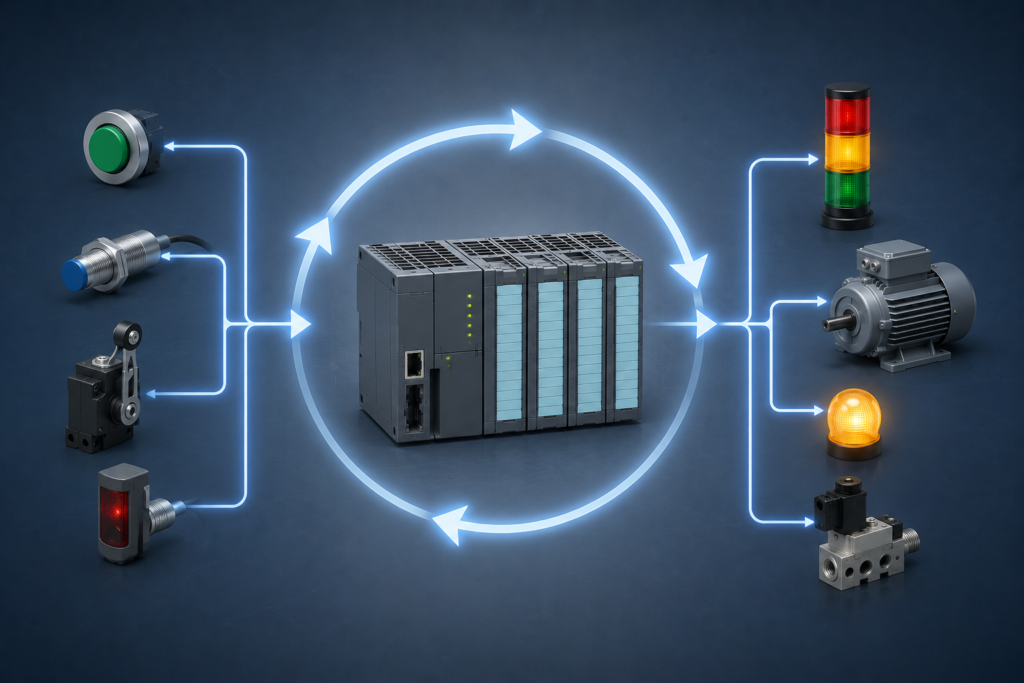
The PLC Scan Cycle is the process a Programmable Logic Controller (PLC) uses to read inputs, execute the control program, update outputs, and repeat the same sequence continuously. Every modern PLC follows this cycle to monitor machines and control industrial automation systems in real time.
Without the PLC Scan Cycle, a PLC would not know when an input changes or when an output should be activated. The scan cycle ensures that every input signal is checked, every program instruction is executed, and every output is updated in the correct order. This continuous operation allows factories and industrial machines to run safely, accurately, and efficiently.
Whether you are a beginner learning PLC programming or an automation engineer improving your skills, understanding the PLC Scan Cycle is one of the most important concepts in industrial automation. It forms the foundation for Ladder Logic, timers, counters, sensors, and output control.
Why Is the PLC Scan Cycle Important?
The PLC Scan Cycle is the reason industrial automation systems operate smoothly and reliably.
Every production line depends on fast and accurate decision-making. If a sensor detects an object, the PLC must process that information immediately and activate the correct output. The scan cycle makes this possible.
Some of the biggest benefits include:
- Fast response to input changes
- Accurate execution of control logic
- Reliable operation of industrial equipment
- Stable machine performance
- Better production efficiency
- Reduced human error
- Improved safety in automated systems
Without a proper scan cycle, industrial machines could miss sensor signals, activate the wrong outputs, or stop working correctly.
How Does the PLC Scan Cycle Work?
The PLC continuously repeats the same operating sequence.
The process starts when the PLC reads all connected input devices.
Next, it executes every instruction inside the user program.
After that, the PLC updates every output based on the program results.
Finally, it performs internal maintenance tasks before starting the next cycle.
Because this process happens repeatedly within milliseconds, operators usually cannot notice the delay.
This fast repetition allows a PLC to control motors, valves, conveyors, pumps, sensors, and many other industrial devices with excellent accuracy.
Understanding the Four Stages of the PLC Scan Cycle
The PLC Scan Cycle follows the same sequence every time. First, it reads the inputs. Next, it runs the program. Then, it updates the outputs. Finally, it performs internal tasks before starting again.
This cycle repeats very quickly. In fact, most PLCs complete one scan in just a few milliseconds. As a result, machines respond almost instantly to changing conditions.
Let's look at each stage in detail.
1. Input Scan
The first stage of the PLC Scan Cycle is the Input Scan.
During this step, the PLC checks every connected input device. These devices may include push buttons, limit switches, proximity sensors, photoelectric sensors, pressure switches, and temperature sensors.
Instead of reacting to every input one by one, the PLC reads all input signals first. Then, it stores their current status in its memory. This stored information is called the input image table.
For example, imagine an operator presses a Start button. During the next input scan, the PLC detects that button as ON. It saves this new state in memory before running the control program.
Because of this method, the PLC works in an organized way. Every program instruction uses the same set of input values during one scan.
Key Points
- Reads every input device.
- Stores input values in memory.
- Creates a stable snapshot of all inputs.
- Prepares data for program execution.
2. Program Execution
After the input scan is complete, the PLC moves to the second stage. This stage is called Program Execution.
Now the PLC begins reading the user program. It usually starts from the first rung of the ladder logic and continues to the last rung.
During this process, the PLC uses the input values stored earlier. It does not read the physical inputs again until the next scan begins.
For example, suppose a Start button is ON and a Stop button is OFF. The PLC checks these values while executing the program. If the logic conditions are true, it decides that the motor should start.
This approach makes the program reliable. Every instruction uses the same input information during the current scan.
Key Points
- Runs the complete PLC program.
- Evaluates every instruction.
- Uses stored input data.
- Calculates the correct output status.
3. Output Scan
Next comes the Output Scan.
At this stage, the PLC sends the final results to all output devices.
These outputs may include motors, indicator lights, relays, contactors, solenoid valves, alarms, or cooling fans.
For example, if the program decides to start a conveyor motor, the PLC turns on the related output. As a result, the motor begins running.
Similarly, if the program detects a fault, it may activate a warning lamp or an alarm.
The important point is that outputs change only after the program has finished executing. Therefore, the PLC always updates outputs in a controlled and predictable way.
Key Points
- Updates every output device.
- Sends commands to field equipment.
- Activates or deactivates outputs.
- Completes the control process.
4. Housekeeping Tasks
Finally, the PLC performs Housekeeping Tasks.
These are internal operations that help the controller work correctly.
For example, the PLC may perform memory checks, update communication data, monitor system health, process diagnostic information, or prepare for the next scan.
Although users do not usually see these tasks, they are very important. They help the PLC remain stable during continuous operation.
Once housekeeping is complete, the PLC Scan Cycle starts again from the beginning.
Because this process repeats continuously, the PLC can monitor and control industrial machines without stopping.
Why the PLC Scan Cycle Repeats Continuously
A PLC never performs only one scan. Instead, it repeats the PLC Scan Cycle as long as power is available.
This continuous operation allows the controller to detect every new input and respond quickly.
For example, a sensor may detect a product moving on a conveyor belt. During the next scan, the PLC reads that signal, processes the logic, and activates the required output.
As a result, the machine responds within milliseconds.
Without continuous scanning, modern automation systems would not work efficiently.
PLC Scan Time Explained
The PLC Scan Cycle is very fast. However, every PLC needs a small amount of time to complete one full scan. This time is known as PLC scan time.
In simple words, scan time is the total time required for the PLC to read all inputs, execute the program, update all outputs, and finish its internal tasks. After that, the PLC immediately starts a new scan.
A short scan time helps the PLC respond quickly. As a result, machines can operate smoothly and safely.
What Affects PLC Scan Time?
Several factors can increase or decrease the scan time of a PLC. Understanding these factors helps you design faster and more reliable automation systems.
1. Program Size
A small program finishes quickly. However, a large program contains more instructions. Therefore, the PLC needs more time to execute every scan.
For this reason, engineers often keep programs simple and well organized.
2. Number of Inputs and Outputs
Every connected device must be checked during the PLC Scan Cycle.
If the PLC controls many sensors, switches, motors, and valves, it has more work to perform. As a result, the scan time may become slightly longer.
3. Complex Logic
Simple ON and OFF logic executes very quickly.
However, complicated calculations, mathematical functions, timers, counters, loops, and communication instructions require additional processing time.
Therefore, complex programs usually have a longer scan time than simple control programs.
4. PLC Processor Speed
Not every PLC has the same processor.
A high-performance PLC can execute thousands of instructions much faster than an entry-level controller.
Because of this, processor performance plays an important role in scan time.
5. Communication Tasks
Many PLCs exchange data with HMIs, SCADA systems, robots, and industrial networks.
While this communication is important, it also requires processing time. Consequently, heavy communication can increase the overall scan time.
Real-World Example of a PLC Scan Cycle
Imagine a conveyor system inside a factory.
A worker presses the Start push button.
First, the PLC reads the button during the input scan.
Next, the program checks whether all safety conditions are satisfied.
If every condition is true, the PLC decides to start the conveyor motor.
Then, during the output scan, the PLC energizes the motor contactor.
Finally, the PLC completes its internal tasks and begins another PLC Scan Cycle.
This entire process happens within milliseconds. Therefore, the conveyor starts almost immediately after the button is pressed.
Common Mistakes Beginners Make
Many beginners misunderstand how a PLC works. However, learning these common mistakes can help you avoid programming problems.
Expecting Instant Input Updates
Some beginners believe that a PLC checks every input continuously.
In reality, the PLC reads physical inputs only during the input scan. After that, it uses the stored values until the next scan begins.
Ignoring Scan Time
Some users never consider scan time while writing programs.
However, large and complex programs may increase scan time. Therefore, it is always a good idea to write efficient logic.
Writing Unorganized Logic
Messy ladder logic makes troubleshooting difficult.
Instead, group related instructions together and use meaningful comments. As a result, maintenance becomes much easier.
Forgetting Safety Logic
Safety should always come first.
Emergency stop buttons, overload protection, and safety interlocks should never be ignored. Therefore, every PLC program should include proper safety conditions.
Best Practices for an Efficient PLC Scan Cycle
Following good programming practices improves both performance and reliability.
Here are some useful recommendations.
- Keep the PLC program simple whenever possible.
- Remove unnecessary instructions.
- Organize ladder logic into logical sections.
- Use meaningful variable names.
- Test every input and output carefully.
- Monitor scan time during system testing.
- Perform regular maintenance and backups.
- Update PLC firmware only when required.
Pingback: Digital Twin in Industrial Automation: Complete Beginner Guide
Pingback: Edge Computing in Industrial Automation: Complete Guide